

Frequently asked questions about purchasing with MyKad, how to use the MyKasih App, and others.


Recipients can purchase basic necessities based on 15 product categories that have the SARA label on the price tag shelf.












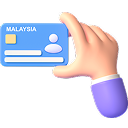
Show the MyKad at the counter for the cashier to check the recipient's MyKad status.




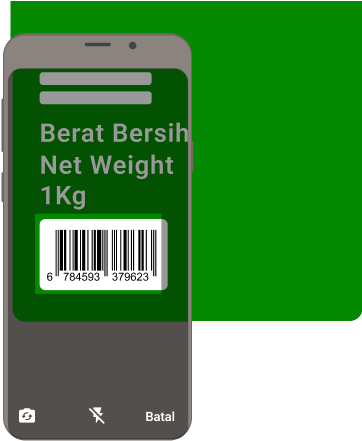
Try to hold the item upright and make sure 'Flash' is turned off before scanning the item.

To change your phone number, please contact our support team:


MyDigital ID is a Malaysian government initiative that provides a secure and trusted digital identity solution. As Malaysia’s official digital identification platform, it allows you to safely and conveniently verify your identity online. Identity verification refers directly to the government database without storing any personal data. It also facilitates access to online applications and portals using only one password and a single digital ID. Please refer to www.digital-id.my for more information.
eKYC (Electronic Know-Your-Customer) is a one‑time identity verification process that requires your MyKad and a facial scan. This verification is carried out via the MyDigital ID application. Please refer to www.digital-id.my for more information.
The MyDigital ID identity verification refers directly to the government database without storing any personal data. It enhances security through national-level authentication, removes the need to remember multiple passwords, and delivers a seamless single sign‑on experience for easier access and smooth identity verification for all Malaysians. This means you can use MyDigital ID to login to the MyKasih App without needing different usernames and passwords.
To enhance security and simplify your login experience, MyDigital ID login is launching on 11 June 2026 as the primary login method for the MyKasih app. Once you log in with MyDigital ID, it enables users to unlock all features, including new ones, within the MyKasih app ecosystem.
No worries, you may continue using the MyKasih app by logging in as Guest.
For the best experience and access to advanced features, we encourage you to register for MyDigital ID as we continue to enhance the MyKasih App.


Registered MyDigital ID users on the MyKasih app will also get access to future enhanced features!
Do not worry if you do not have MyDigital ID when it launches on the MyKasih app. The system will guide you through registration in just a few steps.
Registering for MyDigital ID is simple and can be done on your smartphone or tablet. Follow the steps below:
For additional information about MyDigital ID, please refer to the following.
Each individual is permitted to only register their own identity under MyDigital ID, as the MyKad is personal to holder.
This ensures that every account is truly unique and tied to its rightful owner, preventing the risk of identity misuse. Please refer to www.digital-id.my for more information.

Email OTP (One-Time Passcode) is a verification step used in the MyKasih app to confirm your email address during registration.
This is only required for first-time users who have not yet verified their email. If you have previously verified your email before the transition to MyDigital ID login, you do not need to repeat this process.
The OTP will be sent to your registered email address. Email delivery may take a few minutes due to processing delays. Please note that the OTP is valid for 30 minutes and will expire if not used within this period.
If you do not receive it:
Check your Spam / Junk folder.
Click Resend OTP in the app.
If you still haven't received it, please contact Customer Support at 03-7720 1800 (Mon - Fri, 8.30am – 5.30pm).

You can view your registered email under the Profile section of the app.
If you’re unable to locate it or need assistance, please contact Customer Support at 03-7720 1800 (Mon–Fri, 8.30am–5.30pm).
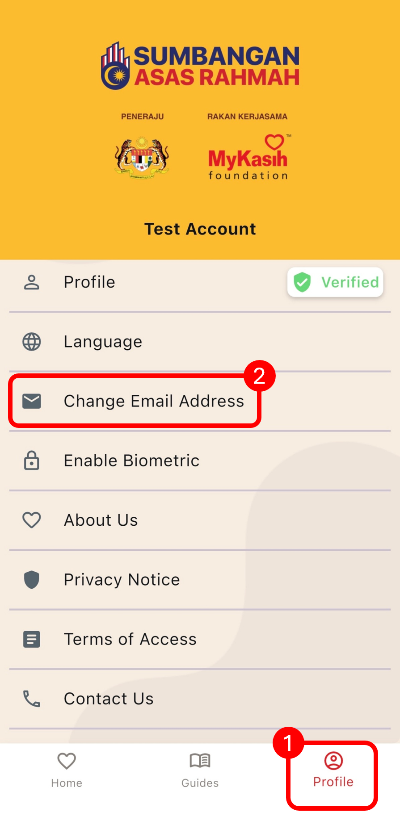
You can view and update your registered email in the Profile section of the app.
If you’re unable to update it or need assistance, please contact Customer Support at 03-7720 1800 (Mon–Fri, 8.30am–5.30pm).
The email verification link will be sent to your new email address. Email delivery may take a few minutes due to processing delays. Please note that the verification link is valid for 24 hours and will expire if not used within this period.
If you do not receive it:
Check your Spam / Junk folder.
Click Resend verification email in the app.
If you still haven't received it, please contact Customer Support at 03-7720 1800 (Mon - Fri, 8.30am – 5.30pm).